Common Port Numbers Cheat Sheet: 42 Ports for SOC Triage
The 42 TCP/UDP port numbers SOC analysts read in firewall logs and SIEM alerts, what each one means in triage, and a printable cheat sheet image to save.

Every port in a firewall alert is a question waiting for an answer. When you can read port 445 and immediately think "SMB. Is this internal or external? Is it going outbound?" you have already shaved seconds off your triage time and reduced the chance of missing something real.
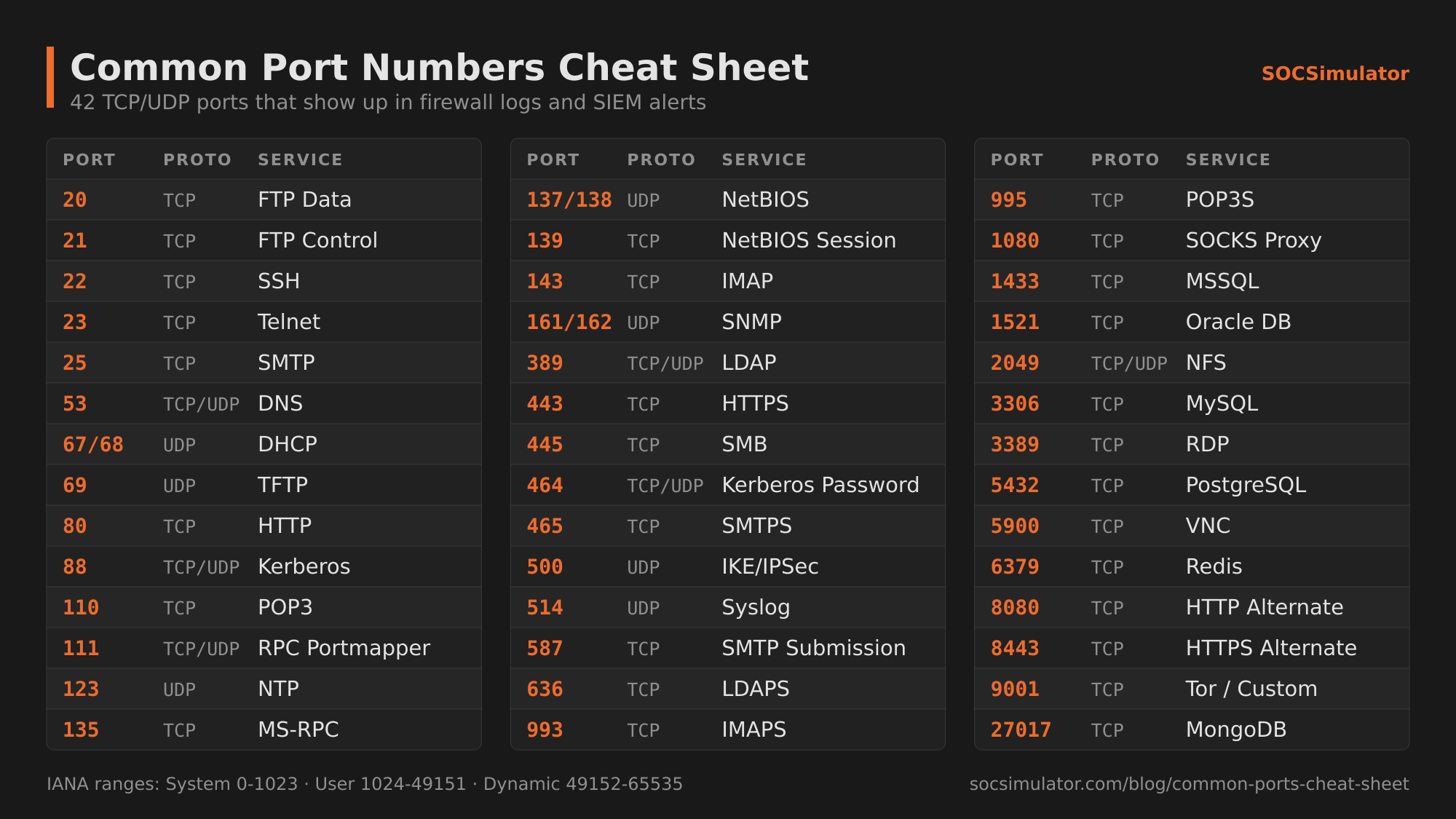
This cheat sheet is the reference I wish I had in my first week on shift. The master table below covers 42 ports. The sections that follow go deep on the ones that matter most for detection work. Memorize the table; understand the sections.
The Master Table: 42 Ports, One Reference
IANA splits the port space into System Ports (0-1023), User Ports (1024-49151), and Dynamic Ports (49152-65535); the full official list is at the IANA Service Name and Port Number Registry. The table focuses on the subset with daily detection relevance.
| Port | Protocol | Service | Why a SOC Analyst Cares |
|---|---|---|---|
| 20 | TCP | FTP Data | Active FTP data transfer; legacy, often blocked |
| 21 | TCP | FTP Control | Command channel; cleartext credentials; frequent scanner target |
| 22 | TCP | SSH | Encrypted remote shell; brute-force magnet on internet-exposed hosts |
| 23 | TCP | Telnet | Cleartext remote shell; any Telnet session today is a red flag |
| 25 | TCP | SMTP | Outbound mail relay; abuse vector for spam and phishing infrastructure |
| 53 | TCP/UDP | DNS | Name resolution; tunneling and C2 exfiltration hide here |
| 67/68 | UDP | DHCP | Address assignment; rogue DHCP server attacks use this |
| 69 | UDP | TFTP | Trivial FTP; used in network device booting and sometimes lateral movement staging |
| 80 | TCP | HTTP | Cleartext web; malware callbacks and phishing pages blend in |
| 88 | TCP/UDP | Kerberos | Windows authentication tickets; Kerberoasting attacks target this |
| 110 | TCP | POP3 | Legacy mail retrieval; cleartext without SSL |
| 111 | TCP/UDP | RPC Portmapper | Remote procedure call; recon target in Unix environments |
| 123 | UDP | NTP | Time sync; NTP amplification DDoS attacks use this |
| 135 | TCP | MS-RPC | Windows RPC endpoint mapper; lateral movement and DCOM abuse |
| 137/138 | UDP | NetBIOS | Legacy Windows name resolution; should not traverse internet |
| 139 | TCP | NetBIOS Session | Pre-SMB Windows file sharing; same caution as 445 |
| 143 | TCP | IMAP | Mail retrieval; cleartext without TLS upgrade |
| 161/162 | UDP | SNMP | Network device management; weak community strings = information leak |
| 389 | TCP/UDP | LDAP | Active Directory queries; outbound LDAP is unusual and worth investigating |
| 443 | TCP | HTTPS | Encrypted web; C2 and data exfiltration blend in here constantly |
| 445 | TCP | SMB | Windows file/print sharing; EternalBlue, WannaCry, lateral movement staging |
| 464 | TCP/UDP | Kerberos Password | Password change in Kerberos; normal in AD but anomalous externally |
| 465 | TCP | SMTPS | SMTP over TLS (legacy); still used by some mail clients |
| 500 | UDP | IKE/IPSec | VPN key exchange; unusual if seen from non-VPN endpoints |
| 514 | UDP | Syslog | Log forwarding; if this goes to an unexpected external IP, investigate |
| 587 | TCP | SMTP Submission | Modern authenticated mail sending; abuse = compromised account |
| 636 | TCP | LDAPS | LDAP over TLS; same caution as 389, encrypted |
| 993 | TCP | IMAPS | IMAP over TLS; the modern replacement for 143 |
| 995 | TCP | POP3S | POP3 over TLS; the modern replacement for 110 |
| 1080 | TCP | SOCKS Proxy | Proxy protocol; attackers use this for pivoting and anonymization |
| 1433 | TCP | MSSQL | Microsoft SQL Server; outbound to internet is almost never legitimate |
| 1521 | TCP | Oracle DB | Oracle database; same external-traffic logic as 1433 |
| 2049 | TCP/UDP | NFS | Unix network file system; unencrypted, should stay internal |
| 3306 | TCP | MySQL | MySQL/MariaDB; internet-exposed instances are frequently targeted |
| 3389 | TCP | RDP | Windows Remote Desktop; the most-scanned port for brute force |
| 5432 | TCP | PostgreSQL | PostgreSQL; should be inaccessible from internet |
| 5900 | TCP | VNC | Remote desktop, often without auth; internet-exposed = critical finding |
| 6379 | TCP | Redis | In-memory data store; no auth by default in older versions |
| 8080 | TCP | HTTP Alternate | Secondary web; dev proxies and misconfigured apps live here |
| 8443 | TCP | HTTPS Alternate | Secondary HTTPS; C2 frameworks and attacker infrastructure favor this |
| 9001 | TCP | Tor / Custom | Tor relay default; also used by attacker tooling for C2 |
| 27017 | TCP | MongoDB | MongoDB; notoriously misconfigured and internet-exposed |
The same 42 ports fit on one landscape page. Open the full-size PNG (2000×1125) to print it, save it, or keep it open on a second monitor.

Web Traffic: Ports 80, 443, and 8080
Port 80 (HTTP) is the foundation of the web, but from a detection standpoint its main value today is as a canary. Legitimate enterprise applications have mostly migrated to HTTPS. HTTP traffic from endpoints to external destinations is worth a second look: malware callbacks, HTTP-based C2 frameworks, and data exfiltration over plaintext HTTP still occur precisely because some organizations do not inspect or block port 80 outbound.
Port 443 (HTTPS) is where the real detection challenge lives. Because HTTPS is encrypted, you cannot inspect the payload at the network layer without SSL inspection. Threat actors have known this for years: Cobalt Strike, Brute Ratel, Havoc, and most modern C2 frameworks default to HTTPS callbacks on port 443. What you can see is the destination IP and domain, certificate details, connection frequency, and byte volume. A host making an HTTPS connection to a recently registered domain every 60 seconds, or a domain whose certificate was issued within the last week, is worth investigating regardless of port. Inbound is where the port number stops helping. A web shell is reached over the same 443 you already allow, on your own server, from wherever the operator happens to be. Nothing about the port or the destination looks wrong, which is why that detection lives in the request log and not in the firewall.
Port 8080 (HTTP Alternate) shows up in several contexts relevant to analysts. Developer proxies often listen here. Misconfigured application servers expose management interfaces on 8080. Attackers also stage payloads here. If you see a workstation connecting outbound to an unfamiliar external IP on port 8080, the combination of a non-standard port and a non-browser process making the connection is a useful pivot point.
Defending against web-layer abuse requires behavioral baselining on DNS and HTTP traffic patterns, not just port filters.
Remote Access: The Attack-Surface Ports
Warning
Port 3389 (RDP) exposed directly to the internet is one of the most consistent findings in ransomware intrusion post-mortems. If your organization has RDP open to the public internet, that is a critical remediation, not a tuning exercise.
Port 22 (SSH) is the backbone of remote administration in Linux and Unix environments. It is also one of the most-scanned ports on the internet. Automated scanners attempt default credentials and known CVEs against SSH constantly. What makes SSH interesting for defenders is not just brute force: once an attacker has a valid credential, SSH provides a fully encrypted tunnel. Lateral movement via SSH key-based authentication from a compromised host produces log events (successful logins from unusual source IPs, new authorized_keys entries) that are worth building detection rules around. NIST guidelines on secure SSH configuration recommend key-only authentication and disabling root login as baseline controls.
Port 23 (Telnet) sends all data in cleartext, including credentials. Virtually no legitimate enterprise environment should have Telnet running as of this writing. If a Telnet connection appears in your logs from an endpoint to any destination, the correct classification is suspicious until proven otherwise. Legacy network devices (some printers, aging switches) sometimes still run Telnet by default; those are remediation candidates.
Port 3389 (RDP) is the most consequential remote-access port for SOC work. The CISA #StopRansomware Guide names exposed, poorly secured remote services as a common way ransomware actors get in, and the native RDP client as how they then move across the network. CISA's Known Exploited Vulnerabilities catalog lists BlueKeep (CVE-2019-0708), a remote code execution flaw in Remote Desktop Services, as exploited in the wild. Detection priorities for RDP include: failed login spikes followed by a success (brute force), logins at unusual hours or from unexpected geographic locations, and RDP sessions initiated from a workstation (not a jump box) to another workstation, a classic lateral movement signal. If RDP must be internet-accessible, it should go through a VPN or at minimum enforce network-level authentication and account lockout policies.
Port 5900 (VNC) carries Virtual Network Computing, a remote desktop protocol that historically has shipped with weak default authentication or none at all. Internet-exposed VNC instances are a regular finding in vulnerability scans and a common initial-access vector when discovered. A VNC session in your firewall logs where the destination is an internal server and the source is a workstation that does not normally use remote administration tools deserves immediate attention.
Email Ports: The Phishing Infrastructure Layer
Email is the primary initial access vector across enterprise intrusions. Understanding the port landscape makes your email-alert triage more precise.
Port 25 (SMTP) is the port mail servers use to talk to each other. Outbound SMTP from a workstation (as opposed to a mail server) is a strong indicator of a spambot, credential-abusing malware, or a phishing kit running on a compromised host. Most organizations block outbound port 25 from workstations for this exact reason; if you see it in your logs, it is worth escalating.
Port 587 (SMTP Submission) is the modern authenticated path for mail clients sending through a relay. Attackers who compromise a user's email credentials will typically use port 587 with the stolen credentials to send phishing at scale from a legitimate account. A spike in outbound 587 traffic from a single endpoint, especially at odd hours, is a common indicator of an account-compromise-based phishing campaign. The FBI IC3 puts Business Email Compromise losses at $55 billion between October 2013 and December 2023, and says the scam frequently runs through legitimate email accounts compromised by social engineering or intrusion. That fraud is the objective the port traffic is serving, financial theft in ATT&CK's Impact tactic, and naming it changes what you look for on the same host. Outbound 587 at volume is the loud version. The quiet one is a single authenticated session that drops three messages into an existing payment thread and creates an inbox rule to file the replies out of sight, which moves far more money than the spam run and barely registers as traffic at all.
Ports 465 (SMTPS), 110 (POP3), 143 (IMAP), 993 (IMAPS), 995 (POP3S) are the remaining email ports your detection coverage should include. POP3 and IMAP without TLS (110, 143) send credentials in cleartext; if you see those in traffic from modern endpoints, that is a misconfiguration worth flagging. The TLS variants (993, 995) are normal for legacy mail clients. Unusual connections on any of these ports from non-mail-application processes are worth a pivot into the process-level data from your EDR.
For a deeper investigation workflow on email-based threats, the phishing email analysis guide covers header analysis, SPF/DKIM checks, and URL pivoting in detail.
File Transfer: Where Data Leaves
Ports 20 and 21 (FTP) carry unencrypted file transfers. Port 21 is the control channel (commands and authentication, both cleartext); port 20 is the data channel in active mode. FTP has been deprecated in most enterprise environments in favor of SFTP (SSH-based, port 22) or FTPS (TLS-wrapped). If FTP appears in outbound logs from a workstation, the two most common explanations are a legacy application that has not been updated and an attacker exfiltrating data. Neither is acceptable to leave without investigation.
Port 445 (SMB) carries the Server Message Block protocol: Windows file sharing, printer sharing, and administrative shares. It is the port responsible for some of the most destructive malware in recent history. The EternalBlue exploit, leaked from the NSA and weaponized in WannaCry in 2017, spread via SMB on port 445. On the day it broke, the US-CERT alert (now hosted by CISA) cited reports of tens of thousands of infections in over 150 countries. The detection rule that would have caught early propagation was simple: SMB connections from workstations to other workstations on port 445, especially where the source is not a file server or domain controller. WannaCry found its next victims by probing addresses for an open 445, which is network service discovery run by a worm instead of an operator. Outbound SMB to external IPs is almost universally malicious.
Port 2049 (NFS) carries the Network File System protocol used primarily in Unix and Linux environments. NFS traffic should stay entirely within trusted internal segments. Outbound NFS or NFS connections crossing network zones without authorization indicates either a misconfiguration or an attacker attempting to reach or stage on a file share.
The largest transfers in a cloud-hosted environment often use no port on this list at all. Sharing a disk snapshot or enabling bucket replication into an account the attacker owns is a transfer to a cloud account, and it moves terabytes without a single packet crossing a boundary you monitor. The witness is the provider control-plane log, not a firewall rule.
Directory and Authentication: The Keys to the Kingdom
Port 53 (DNS) is the protocol attackers abuse more creatively than almost any other. DNS is allowed outbound in virtually every network because nothing works without it, which makes it an attractive covert channel. DNS tunneling tools encode data in the subdomain field of DNS queries and exfiltrate it to an attacker-controlled authoritative server. Detection requires looking at query volume, query length (legitimate hostnames are short; tunneled data produces very long subdomain strings), and the pattern of queried domains. Connections to recently registered domains or domains with high entropy names are the most actionable signals. SANS Internet Stormcast covers DNS abuse patterns regularly with practical detection examples.
Port 88 (Kerberos) is the authentication backbone of Active Directory environments. Kerberoasting, one of the most common privilege escalation techniques against Windows domains, works by requesting service tickets over Kerberos and then cracking them offline. The MITRE ATT&CK technique T1558.003 documents this in detail. Detection requires monitoring for unusual volumes of TGS-REQ requests (Event ID 4769 in Windows Security logs) from a single account, particularly for service accounts with high-privilege SPNs.
Port 123 (NTP) provides time synchronization. Beyond its operational role, NTP has been weaponized in amplification-based distributed denial of service attacks: a small query to a misconfigured NTP server can produce a response many times larger, directed at a victim IP. Unusually large NTP responses, or an endpoint sending NTP queries to servers outside your approved time servers, are worth investigating.
Ports 389 and 636 (LDAP and LDAPS) are the query interface to Active Directory. LDAP reconnaissance is a staple of post-compromise enumeration: tools like BloodHound use LDAP to map the entire AD graph in minutes. Outbound LDAP from a workstation to an external IP has essentially no legitimate use case. Even internal LDAP from a workstation (rather than from a server or management tool) at unusual times is worth a pivot into what process initiated the connection.
Database Ports: Your Most Sensitive Assets
Database ports in firewall logs are a reliable high-signal category. Legitimate database traffic in a well-architected environment should move between application servers and database servers on the internal network, full stop. Any of the following appearing in outbound firewall logs from a workstation deserves immediate attention.
Port 1433 (MSSQL) is Microsoft SQL Server. An endpoint connecting to an external IP on 1433 is almost certainly either exfiltration or an attacker communicating with a database they have compromised on internet infrastructure. Internal anomalies worth watching include a new server-to-database connection path that did not exist yesterday, or a service account making database queries at 3 AM.
Port 3306 (MySQL) and Port 5432 (PostgreSQL) follow the same logic. Both are frequently misconfigured on cloud instances without authentication or with default credentials, making them among the most targeted ports in cloud-environment scans. Shodan regularly surfaces thousands of internet-exposed database instances. If your organization runs cloud infrastructure, verifying that database ports are not exposed to 0.0.0.0/0 is a basic hygiene check.
Port 6379 (Redis) and Port 27017 (MongoDB) have been responsible for some of the most publicly visible data-exposure incidents of the past decade. Both shipped for years with no authentication by default. Internet-exposed instances have been wiped for ransom and used as pivot infrastructure. Internal traffic on these ports is normal; external traffic is a finding.
Ports Attackers Love: Staging, C2, and Evasion
This section describes patterns worth monitoring in firewall and proxy logs. Seeing any single port here is not automatically an incident; context, process, and behavioral pattern are what move a log line from interesting to escalation.
Port 4444 is the default listener port for Metasploit's Meterpreter payload. It is the port most commonly seen in capture-the-flag environments and in attacker-facing demos. In a real intrusion, sophisticated attackers change the default, but less experienced threat actors and automated malware-as-a-service kits do not always bother. Outbound connections to any external IP on port 4444 from a workstation are a near-certain true positive.
Port 1080 (SOCKS) is a general-purpose proxy protocol. Attackers use SOCKS proxies to pivot through compromised hosts into internal networks, or to anonymize outbound connections by routing through a compromised machine. ATT&CK tracks that use as T1090 (Proxy), and it reads as a network problem first: one internal host carrying traffic for others. A process listening on 1080 on a workstation that does not run a SOCKS proxy as part of its normal function is a red flag for an implant or post-exploitation framework.
Port 8443 mirrors 443 as an HTTPS alternate. C2 frameworks like Cobalt Strike, Covenant, and Sliver allow operators to configure callbacks on 8443 specifically to blend into environments where 443 is heavily inspected or where a second HTTPS port appears less conspicuous. The detection logic is the same as for 443: look at behavioral patterns, destination reputation, and certificate validity rather than just the port number. ATT&CK files that whole pattern under encrypted channel, and the label carries a practical consequence: those frameworks commonly encrypt their payload data themselves before it is wrapped in TLS, so even a proxy doing TLS inspection is looking at ciphertext where the payload content should be. What stays readable is the envelope around it, and that is where the hunting actually happens: the request URIs and headers the proxy logs, the host and user-agent the C2 profile chose to imitate, the certificate subject and issuer, how long the connection stayed open, and how regular the byte counts are. Where nothing is doing TLS inspection at all, the HTTP layer goes too and only that session metadata is left. It also means blocking the port outright is rarely on the table, because 8443 has a legitimate life on Tomcat and on plenty of appliance admin consoles.
Port 9001 is the default port for Tor's ORPort, used by Tor relay nodes. Connections to known Tor guard and relay IPs on port 9001 from an enterprise endpoint indicate either policy-violating Tor usage or malware with Tor-based C2. Some ransomware families route their negotiation traffic through Tor.
High ephemeral C2 patterns deserve mention beyond specific ports. Attackers increasingly randomize ports into the high ephemeral range (above 49152) to avoid port-based detection rules. What you look for instead is behavioral consistency: a process making periodic outbound connections to the same external IP, regardless of port, with regular intervals and relatively uniform byte sizes. Those patterns indicate beaconing and are detectable through statistical analysis in a mature SIEM. MITRE ATT&CK tracks this as Non-Standard Port (T1571), with procedure examples of real C2 running over ports such as 1224, 4050, and 14146.
Note
Building this port knowledge into muscle memory is significantly faster through hands-on practice than through reading alone. The firewall rooms in SOCSimulator present realistic log queues where these exact port patterns appear as live investigation challenges.
What Does This Mean for Security+ and Other Certifications?
If you are preparing for CompTIA Security+, the CySA+, or any entry-level blue team certification, ports are a near-certain topic. The exam objectives for Security+ SY0-701 explicitly include network protocols and associated ports under the infrastructure domain.
The subset to prioritize for exam purposes: 20/21 (FTP), 22 (SSH), 23 (Telnet), 25 (SMTP), 53 (DNS), 80 (HTTP), 110 (POP3), 143 (IMAP), 443 (HTTPS), 445 (SMB), 3389 (RDP), 3306 (MySQL), 1433 (MSSQL), and 389/636 (LDAP/LDAPS). Understanding not just what service runs on each port but the specific attack pattern associated with it separates candidates who recall definitions from those who demonstrate applied knowledge.
For interview preparation, the SOC analyst interview questions guide covers how interviewers test port knowledge in practice: not as isolated recall, but as the starting point for a log-analysis scenario. The answer that impresses is not "port 445 is SMB" but "port 445 is SMB, and outbound connections from a workstation to an external IP on 445 are essentially never legitimate, so my first move would be to check which process owns that connection and whether any 4625 events preceded it."
For broader context on the role where this knowledge gets applied daily, what does a SOC analyst do maps these port skills to real shift workflows.
Using This Cheat Sheet in Practice
Print the master table (the PNG above is sized for a landscape page). Stick it somewhere visible during your first months on shift. The goal is not to have it memorized on day one but to build the reflex through repeated exposure. When you see a port number in an alert and you have to glance at the table, that is fine. When you no longer have to glance, you have internalized the pattern.
The more meaningful skill underneath port memorization is knowing which combinations warrant immediate escalation versus which need corroborating evidence first. Outbound traffic on port 445 to an external IP: escalate immediately without waiting for corroboration. A workstation connecting to port 443 on an external IP: normal by default, interesting only if the destination is new, the connection interval is robotic, or the initiating process is not a browser. That kind of contextual judgment is what alert triage guides are built around.
Bookmark this; the FAQ below covers the rest.
Frequently Asked Questions
- What ports should a SOC analyst know?
- A SOC analyst should know, at minimum, the ports that appear daily in alert queues: 22 (SSH), 23 (Telnet), 25/587 (SMTP), 53 (DNS), 80/443 (HTTP/HTTPS), 445 (SMB), 3389 (RDP), and 1433/3306 (databases). Beyond those fundamentals, knowledge of email retrieval ports (110, 143, 993, 995), directory ports (88, 389, 636), and common attacker staging ports (4444, 1080) distinguishes an analyst who can read a firewall log cold from one who needs to look things up mid-investigation.
- What is port 445 used for?
- Port 445 carries SMB (Server Message Block), Microsoft's file-sharing and printer-sharing protocol. It is one of the most attack-relevant ports in the Windows ecosystem. WannaCry spread by exploiting EternalBlue on port 445. Outbound SMB traffic from a workstation to an external IP is almost always an immediate escalation trigger, because legitimate corporate file sharing does not leave the internal network on that port.
- Which ports do attackers target most?
- Attackers frequently abuse RDP (3389) for brute-force and credential-stuffing campaigns against exposed Windows systems. Port 445 (SMB) has been weaponized in multiple major ransomware outbreaks. SSH (22) sees constant brute-force scanning in internet-exposed environments. Beyond these, threat actors establish C2 over HTTPS (443) to blend with legitimate traffic, and use ports like 4444, 1080, and 8443 for reverse shells and SOCKS proxies when custom staging infrastructure is in play.
- What is the difference between TCP and UDP in a security context?
- TCP is connection-oriented: it uses a three-way handshake and guarantees ordered, reliable delivery. UDP is connectionless and sends packets without establishing a session first. From a detection standpoint, TCP's handshake produces more visible state in firewall logs, making anomalies like SYN floods or half-open connections identifiable. UDP is harder to baseline because it lacks connection state; large volumes of UDP traffic on port 53 (DNS) or 123 (NTP) are common amplification-attack and tunneling vectors worth monitoring.
- What is the difference between well-known, registered, and dynamic ports?
- The IANA divides the 65,535 port space into three ranges. Well-known ports (0-1023) are reserved for core protocols: HTTP is 80, HTTPS is 443, SSH is 22, DNS is 53. Registered ports (1024-49151) are assigned to specific applications by IANA but do not require root privileges: MSSQL is 1433, RDP is 3389, MySQL is 3306. Dynamic or ephemeral ports (49152-65535) are assigned temporarily by the OS for outbound client connections and are not tied to any fixed service. For SOC work, traffic using well-known ports for unexpected services, or outbound sessions to high ephemeral ports with no matching inbound connection, are patterns worth investigating.
Field notes
New walkthroughs and detections, in your inbox
A short email when we publish something worth your time. No spam, unsubscribe in one click.
Community
Continue the conversation
Discuss this with analysts who are actively training and working in the field.
Related Articles

Alert Triage: Real Threats vs False Positives
Alert triage is the core SOC skill. Learn the framework analysts use to assess severity, confirm IOCs, and separate real threats from false positives.

SOC Analyst Interview Questions: 30 With Answers
SOC analyst interview questions decoded: what interviewers test, sample answers, and log examples to study before your first security ops interview.

SOC Playbook Template: Steps, Queries and Thresholds
Copy this SOC playbook template: triggers, steps, SPL/KQL/Lucene queries and branch thresholds for one alert type, with two filled-in examples.